Kettle, 2 Slice Toaster & Microwave
976/2349
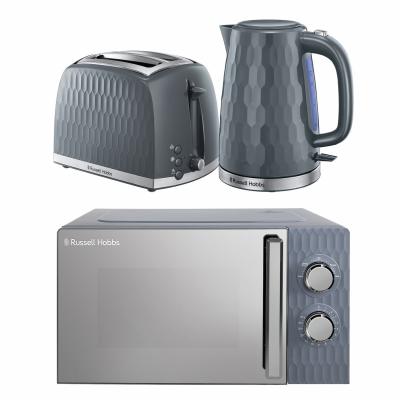
Product details
- Brand: Russell Hobbs
- Catalogue number: 976/2349
- Manufacturer's number: HCBNDL2G
Russell Hobbs Support
 UK:
 Eire:

Argos Troubleshooter
Resolve problems quickly with this easy-to-use tool.
Email me this page
Enter your email address to have this page emailed to you *
Useful links
Your Free WarrantyFAQs
If your microwave has no power, try these steps:
- Unplug the microwave from the plug socket. Hold down the Start or Stop button for 10 seconds whilst unplugged, and then plug back in.
- Try an alternative mains plug socket, not an extension lead.
- Change the fuse in the plug.
If this doesn't resolve the issue, please get in touch with the support team using the contact details on this page.
If your microwave is not heating properly, try these steps:
- Ensure the microwave is not on a defrost setting.
- Ensure the heating time is appropriate for the item you have placed in the microwave.
- Unplug the microwave from the plug socket. Hold down the Start or Stop button for 10 seconds whilst unplugged, and then plug back in.
- Try an alternative mains plug socket, not an extension lead.
If the issue is not resolved, please get in touch with the support team using the contact details on this page.
If the turntable isn’t spinning properly, try these steps:
- Check for any debris or obstructions around the turntable.
- Ensure it is seated correctly.
- Check that the item being placed in the microwave is the correct size. If it is too large it may catch on the top of the microwave, preventing it from turning correctly.
If this doesn't resolve the issue, please get in touch with the support team using the contact details on this page.
If the light bulb has stopped working, try these steps:
- Unplug the microwave from the plug socket. Hold down the Start or Stop button for 10 seconds whilst unplugged, and then plug back in.
- Try an alternative mains plug socket, not an extension lead.
If the issue is still not resolved, please contact the support team using the details on this page. Do not attempt to replace the bulb yourself until you have checked with the support team if you are able to do this for your model.
To clean your microwave, do the following after each use:
- Wipe away any condensation from the walls.
- Remove any loose debris with a microfiber cloth.
- Use warm soapy water to clean and avoid harsh abrasives.
If your microwave has condensation on the walls, this is expected if you are cooking something with high moisture content.
After each use you should ensure the walls are wiped down and the door is left ajar to encourage any existing condensation to evaporate.
If the lid isn’t closing properly, check these things first:
- Check for any damage or debris.
- Check for any limescale build-up around the lid mechanism and remove.
If the issue remains, please contact the relevant support team by using the contact details on this page.
If the kettle stops before it reaches boil, check the following:
- Try an alternative mains plug socket.
- Check for any limescale at the bottom of the kettle and use a descaling solution to remove. A build-up of limescale can cover the elements and reduce its efficiency to boil.
If the issue remains, please contact the relevant support team by using the contact details on this page.
If your kettle has no power, check the following:
- Try an alternative mains plug socket. This will help work out if the issue is with the mains socket or the kettle itself.
- Change the fuse in the plug. You can watch the below video on how to change the fuse in the plug.
If the issue remains, please contact the relevant support team by using the contact details on this page.
If the water is cloudy, this could be due to a build-up of limescale. This could be on the base of the kettle or in the filter spout. You can remove this using a descaling solution.
We advise only using the kettle to boil water and no other liquids.
Below is a list of things not recommended to be put into a microwave:
- Metallic objects such as containers for food and beverages.
- Food wrapped in aluminium foil and foil trays.
- Metal trimmed crockery, containers, cutlery or utensils.
- Metal twist ties.
All of these may cause arcing and damage to the microwave.
Other materials unsuitable for microwave use:
- Paper, cardboard and waxed paper packaging - unless stated as microwave safe on the labelling.
- Plastics and Foam packaging - unless stated as microwave safe on the labelling.
- Whole eggs in shells.
Ensure only microwave safe products are used in your microwave. Microwave safe items commonly use this symbol 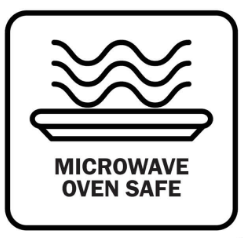 . Always check your user manual for specific guidance and usage.
Generally, the answer is no as putting foil in a microwave can be dangerous. Aluminium foil reflects microwaves instead of absorbing them, which can cause sparks, fire hazards, and damage to the appliance.
Why is it risky?
- Aluminium foil can create arcing (sparks) when it touches the microwave walls or forms sharp edges.
- It can lead to fire if sparks ignite food or paper products.
- It may damage the microwave’s magnetron, the component that generates microwaves.
Are there exceptions?
Some manufacturers allow small amounts of aluminium foil to shield delicate food parts (like poultry tips), but only if:
- The foil is smooth and flat, not crumpled.
- It covers less than 25% of the food.
- It does not touch the microwave walls.
Always check your microwave’s user manual before attempting this.
Note: Only clean the toaster whilst unplugged and away from any plug sockets. The appliance must not be submerged in water in any circumstances.
- Use a small dry brush to gently brush any debris from the inside of the toaster into the crumb tray.
- Remove and empty the crumb tray, and wipe this clean.
- Wipe down the sides with warm water and soap, avoiding harsh abrasives.
If your toaster has no power, try the following:
- Try an alternative mains socket.
- Change the fuse in the plug. You can view our video below on how to change the fuse.
If this does not resolve your issue, please get in touch with the support team using the contact details on this page.
If the lever is not going/staying down then try the following:
- With the power off and unplugged, check there is no debris or blockages under the lever.
- With the power off and unplugged, empty and clean the crumb tray.
- Then plug the unit back in and try the lever again.
If this does not resolve your issue, please get in touch with the support team using the contact details on this page.
If the toaster has tripped the electrics, try the following:
- Try an alternative mains plug socket.
- Change the fuse. You can view our video below on how to change the fuse in the plug.
If this does not resolve your issue, please get in touch with the support team using the contact details on this page.
Questions & answers
How-to videos
-
Cleaning and Maintenance
-
Replacing the Waveguide Cover on a Microwave
-
Easy Ways to Descale Your Kettle
Interactive Help
-
Argos Troubleshooter
Resolve problems quickly with this easy-to-use tool.


Returns policy
If you need advice or support for your product, please in the first instance contact the support provider using the number on this support page.
If you still need to return your product then please visit our most up to date returns policy here.