ONE BLADE PRO 360
313/2810

Product details
- Brand: Philips
- Catalogue number: 313/2810
- Manufacturer's number: 8.72E+12
Philips Personal Care Support
 UK:
UK:
 Eire:
Eire:
Email me this page
Enter your email address to have this page emailed to you *
FAQs
Only USB adapters that meet specific specifications should be used to connect your Philips OneBlade to the wall socket, as using the wrong adapter may damage the device.
What type of adapter should I use?
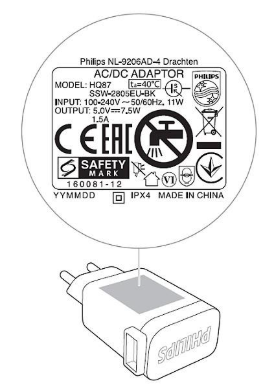
To safely and efficiently charge your OneBlade, ensure that your USB adapter meets the following specifications:
- Input voltage: 100–240 V.
- Output voltage: 5 V.
- Power output: 1 A or higher.
- If you intend to charge your OneBlade in an environment with a lot of moisture or humidity (a bathroom, for example) always use a splash-proof (IPX4*) rated adapter.
You can find these specifications printed on the adapter itself (see the example below) or in the documentation you received when purchasing your adapter.
*Tip: the X in IPX4 is a placeholder and another digit may appear in its place (e.g. IP24 or IP44) in the description of an adapter. As long as the second digit after "IP" is "4" the adapter is classified as splash-proof.
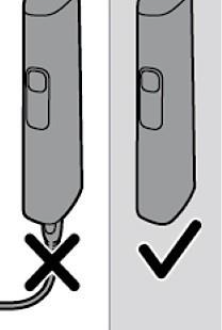
The OneBlade is designed to operate only cordless for safety, as it can be used for wet and dry shaving. Using it near water while plugged in is dangerous, so the device doesn't function when connected to a power outlet.
The Philips HQ87 adapter for OneBlade is splashproof, meaning it can handle splashes of water but should not be in direct contact with water for long. While charging, keep the device and adapter away from water or wet surfaces.
Philips OneBlade can be used effectively on dry skin, wet skin, or even with shaving gel or foam. Additionally, the waterproof handle on your OneBlade also means that you can use it in the shower.
If your OneBlade is equipped with a charging port cover, ensure that the cover is firmly closed before getting the handle wet.
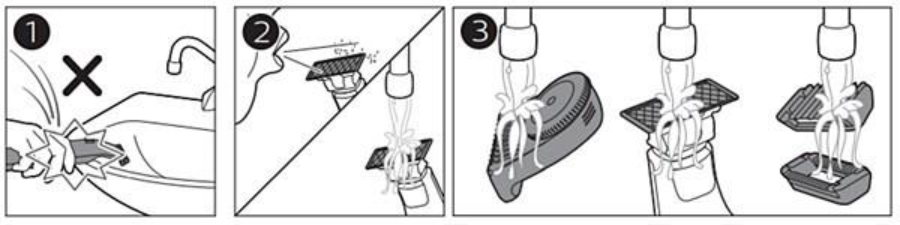
Cleaning your OneBlade after each use ensures efficient performance and the best shave. Follow the steps below to clean your device:
1. To prevent damaging your OneBlade, avoid banging the handle against sinks or hard surfaces.
2. Remove attachments from the device and blow off remaining hair on the blade. Turn on your OneBlade and rinse the blade and handle under lukewarm water.
3. Rinse the attachments separately under lukewarm water.
Do not dry the blade with a towel or tissue; let the device and attachments air-dry. Avoid using sharp objects like tweezers to remove hair from the device.
Philips OneBlade can trim, shave, and style body hair, including intimate areas. For larger areas like legs, arms, or torso, use the regular OneBlade blade with attachments. For sensitive areas like the groin or armpits, use the specified attachments.
Note: Philips OneBlade is for trimming and shaving facial and body hair, not for scalp hair.
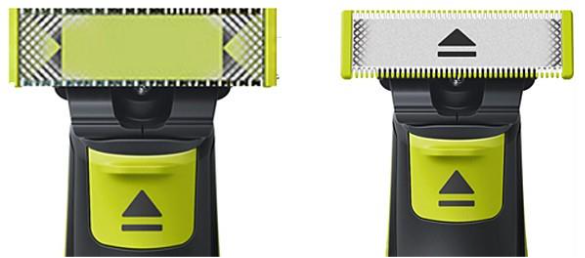
Check the blade's appearance to know when to replace it in your OneBlade. If you have a Bluetooth-connected OneBlade, refer to the Philips Daily Care app for guidance. Read further to learn more about blade replacement.
Replacement indicator
Your OneBlade features a blade-wear indicator that changes as you use it. The pattern will eventually form an arrow symbol, signaling it's time for a replacement. Older models may show a green bar instead. Shaving frequency and accessories can affect the indicator. For best performance, replace the blade every four months.
Different OneBlade models indicate charging status in various ways. Refer to the information below to find the description that matches your model.
Light ring flashes when charging and light continuously when the device is fully charged. The light ring will turn off 30 minutes after your OneBlade is fully charged to save energy.
| LED on the handle | LED on the adapter
| Battery percentage |
|
|
|
|
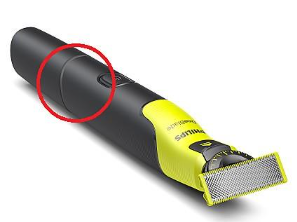
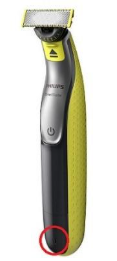
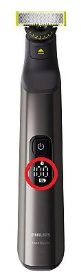
If unsure if your Philips OneBlade is charging, switch it on while connected to power. If it doesn't turn on, it's charging due to a safety feature that prevents operation while charging, reducing the risk of getting wet during use. Note: models with an LED or digital charging indicator will show when charging.
Air travel
Airlines have varying requirements for battery-operated products. Always verify your airline's specific rules before traveling. Most allow lithium-ion batteries under 100-watt hours in hand luggage, which includes all Philips shavers. If unsure, check with your airline.
Charging abroad
When charging Philips shavers abroad, ensure the power supply matches the charger or plug adapter specifications, typically found on the plug/adapter. If the only difference is the number of pins or plug shape, a standard travel plug adapter can be used with your home plug/adapter.
If you are unable to resolve the issue, then please either call us using the phone number on this page OR click HERE to arrange a return or exchange.
Questions & answers


Returns policy
If you need advice or support for your product, please in the first instance contact the support provider using the number on this support page.
If you still need to return your product then please visit our most up to date returns policy here.