Ninja AutoBarista Expresso & Filter Coffee Machine
869/0979
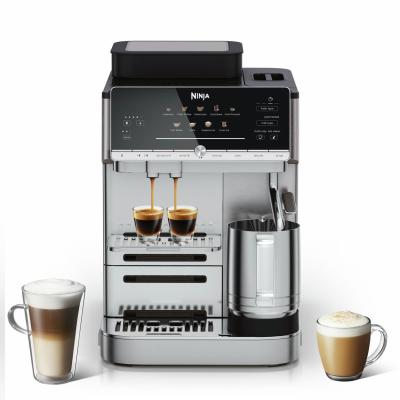
Product details
- Brand: Ninja
- Catalogue number: 869/0979
- Manufacturer's number: AE1001UK
Nutri Ninja Support
 UK:
 Eire:
Email me this page
Enter your email address to have this page emailed to you *
FAQs
• If you’re brewing an espresso drink, you can change the grounds-to-water ratio by using the strength settings.
• If you’re brewing a filter coffee drink, select the desired size using the SIZE button before grinding.
• Brew unit may be clogged. Ensure you are removing and cleaning your brew unit on a monthly basis to prevent blockages.
• The machine needs to be descaled: Refer to Descaling in the Descaling & Clean Cycle section.
Please refer to the instruction manual for the above procedures.
• Decrease the grind size offset. See the Adjusting the Grind Size section.
• Decrease the brew temperature: Use the TEMP button on the display to decrease the temperature setting of your brew.
• Try experimenting with different roasts and bean types to suit your taste.
Please refer to the instruction manual for the above procedures.
• Increase the grind size offset.
• Increase the brew temperature: Use the TEMP button on the display to increase the temperature setting of your brew.
• Try experimenting with different roasts and bean types to suit your taste.
Please refer to the instruction manual for the above procedures.
• Preheat the machine: Run a pre-ground coffee brew without putting any pre-ground coffee in. This will run hot water through the system.
• Preheat the cup: Rinse the cup under hot water before brewing to increase the temperature of the brew.
• Adjust temperature: Increase the temperature of the brew by using the TEMP button on the control panel.
• Use heated froth settings: All froth settings are heated except cold foam, which is denoted by a snowflake.
• The machine needs to be descaled.
Please refer to the instruction manual for the above procedures.
• Ensure the brew unit is in the “home” position. See the Brew Unit Home Position section in the instruction manual.
• The tamper is in the incorrect position. Do not use the machine, and contact Customer Service.
• If the control panel displays “Er” and then a number (ex. “Er 03”), contact Customer Service at 0800 862 0453.
How-to videos
-
How to change your plugs fuse
-
How to Complete a Power Cycle


Returns policy
If you need advice or support for your product, please in the first instance contact the support provider using the number on this support page.
If you still need to return your product then please visit our most up to date returns policy here.