Garmin Instinct 3 Solar 45mm Smart Watch - Whitestone/Blue
809/2584
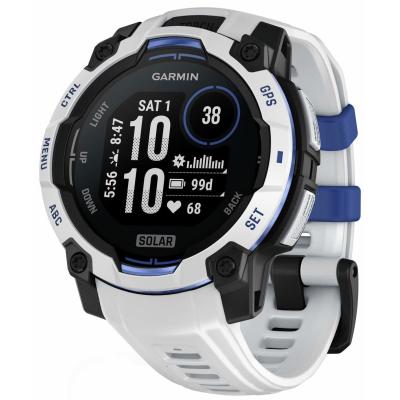
Product details
- Brand: Garmin
- Catalogue number: 809/2584
- Manufacturer's number: 010-02934-03
Garmin Support
 UK:
 Eire:
Email me this page
Enter your email address to have this page emailed to you *
FAQs
If your phone will not sync or connect to your watch, check the following:
- Make sure Bluetooth is turned on for both the watch and the phone.
- On the phone, check that the Garmin Connect app has permission to use Bluetooth, location services, and background data/“run in background” permissions.
- Ensure no anti-battery or restrictive mode (e.g. Doze on Android) is blocking activities.
If syncing fails or the watch does not show up in Garmin Connect: remove/unpair the watch, then add it again. This sometimes clears pairing corruption (check your watch user manual for this procedure).
If your watch is frozen, connect it to power and then perform a forced restart. Depending on model: hold certain buttons (often the Power / Light / Action button) for 10-30 seconds until it reboots.
If the heart rate monitoring is not accurate, check the following:
- Ensure the watch fits properly (not too loose, not too tight), with skin contact over the sensor.
- Clean the sensors removing any sweat / dirt.
- If you are using an external heart-rate strap, ensure it is properly paired.
- Update the firmware on your watch.
If the battery on your watch is draining too fast, try the following to help improve battery life:
- Disable unneeded sensors (e.g., continuous heart rate, always-on display mode).
- Choose a simpler watch face.
- Turn off any feature you don’t use.
- Solar charging only works when your watch is exposed to sufficient sunlight. Ensure the watch face is not covered by clothing, such as a sleeve, and try using it outdoors in sunny conditions.
- Solar charging will also stop if the battery is already full or if the watch is connected to an external power source.
- Your watch is designed to protect its battery from extreme temperatures. If the watch becomes too hot or too cold, it may automatically limit or stop solar charging to protect the battery.
No. Solar charging is disabled when the watch is connected to an external power source. Additionally, solar charging will not occur when the battery has already reached full charge.


Returns policy
If you need advice or support for your product, please in the first instance contact the support provider using the number on this support page.
If you still need to return your product then please visit our most up to date returns policy here.