Ninja ES601UKBK Luxe Cafe Premier Espresso Coffee Machine
766/1552
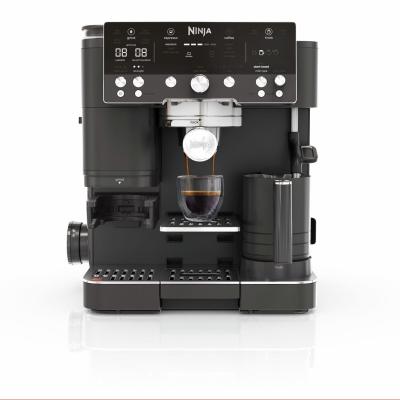
Product details
- Brand: Ninja
- Catalogue number: 766/1552
- Manufacturer's number: ES601UKBK
Nutri Ninja Support
 UK:
UK:
 Eire:
Eire:
Email me this page
Enter your email address to have this page emailed to you *
FAQs
Preheat the portafilter: Rinse the portafilter under hot water before grinding. Please make sure that
the basket is completely dry before grinding.
Preheat the cup: Rinse the cup under hot water before brewing to increase the temperature of the
brew.
Adjust water temperature: Increase the temperature of the brew by using the BREW TEMP button on
the control panel.
Use heated froth settings: All froth settings are heated except cold foam, which is denoted with a
snowflake. The machine needs to be descaled
The machine will automatically purge water from the steam wand into the main drip tray after each froth. This is to clean the inside of the steam wand.
Drip tray is full: Check the empty indicator to see if you need to empty the main drip tray.
The water reservoir is not seated firmly: Check that the water reservoir is firmly seated in its place on the back of the machine
• Ensure the machine is plugged into a working socket.
• After plugging the machine in, press the POWER button.
• To save power, the machine will automatically shut off after 20 minutes
This may be caused by the grinder being blocked by beans or moisture clogging the grinder. Try clearing any beans blocking the grinder and ensure the grinder is dry and free from moisture.
Portafilter is not properly aligned: Place the portafilter into the group head by aligning the orange dot on the portafilter with the orange dot on the group head. Fasten the portafilter into the group head until the orange dot on the portafilter aligns with the lock arrow on the group head.
Coffee is tamped too lightly: When tamping, place the portafilter on a level surface. Place the assisted tamper inside the funnel and push down on the tamper until you feel it contact the funnel
Not enough water in the reservoir: Ensure the water reservoir is filled up to the min. line.
The water reservoir is not seated firmly: Check that the water reservoir is firmly seated in its place on the back of the machine.
If the reservoir has water filled over the min. line and is seated firmly, some water pump noise is considered normal.
You may also hear this noise while frothing. This is normal.
Coffee is tamped too lightly: When tamping, make sure to place the portafilter on a level surface. Place the assisted tamper inside the funnel and push down on the tamper until you feel it contact the funnel.
The grind size is too coarse: Let the brew time out and follow the recommended grind setting on your next brew.
Coffee beans are not fresh: Bean freshness will impact the crema quality. When purchasing coffee beans, it’s best to buy a bag with a “Roasted On” date rather than a “Best Before” date to ensure quality and freshness. We recommend you use coffee beans within 20 days of the “Roasted On” date.
Basket may be clogged/holes are blocked: Ensure you are cleaning the baskets frequently. Make sure none of the holes in the bottom of the basket are clogged with grounds
Check if you have beans in the bean hopper.
Press START GRIND to begin grinding. • If there are beans in the bean hopper and you are getting an ADD BEANS notification, unplug the machine and gently push the beans down toward the burrs.
Ensure the bean hopper is securely and properly inserted.
Ensure the portafilter with the funnel assembled is properly installed into the grinding cradle. Remove and reinsert to ensure it is installed correctly.
Using the cleaning brush, clear out any material sitting inside the grinding cradle.
How-to videos
-
How to change your plugs fuse
-
How to Complete a Power Cycle


Returns policy
If you need advice or support for your product, please in the first instance contact the support provider using the number on this support page.
If you still need to return your product then please visit our most up to date returns policy here.