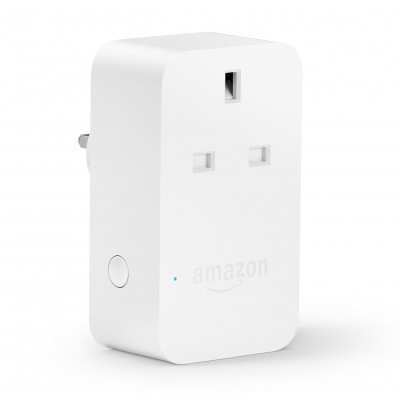
NEW 2020 AMAZON SMART PLUG
484/6064
Product details
- Brand: Amazon
- Catalogue number: 484/6064
- Manufacturer's number: 4846064
Argos Technical Support
 UK:
 Eire:
Email me this page
Enter your email address to have this page emailed to you *
Useful links
Amazon Web SupportFAQs
If your Amazon Smart Plug does not connect to the Wi-Fi, please try the following steps:
Check Wi-Fi Band: The plug only supports 2.4 GHz Wi-Fi, not 5 GHz.
Restart Devices: Power cycle your router and plug.
Proximity: Plug it in near your router during setup.
Reset the Plug:
Press and hold the button on the side until the LED blinks red and blue (about 12 seconds).
Reattempt setup using the Alexa app.
If your Amazon Smart Plug is unresponsive in the Alexa app, please check these possible reasons and fixes:
Wi-Fi drop: Make sure the plug is still connected to Wi-Fi.
Power cycle the plug by unplugging it and plugging it back in.
Restart Alexa app and try again.
Update the Alexa app from the App Store or Google Play.
To factory reset your Amazon Smart Plug, please carry out the following:
Locate the button on the side of the plug.
Press and hold for 12 seconds.
Wait until the LED flashes red and blue.
The plug is now reset and ready to be set up again.
Questions & answers



Returns policy
If you need advice or support for your product, please in the first instance contact the support provider using the number on this support page.
If you still need to return your product then please visit our most up to date returns policy here.