Philips EP5446/70 LatteGo Bean to Cup Coffee Machine
225/4562
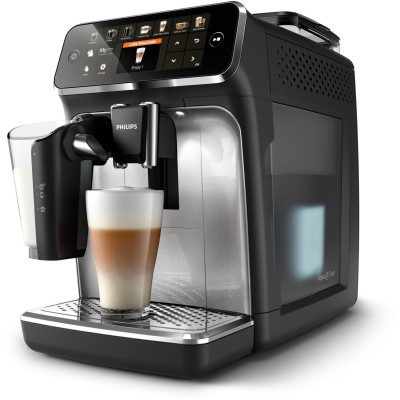
Product details
- Brand: Philips
- Catalogue number: 225/4562
- Manufacturer's number: EP5446/70
Philips Household Support
Email me this page
Enter your email address to have this page emailed to you *
FAQs
The coffee funnel is clogged. Switch off the machine and unplug it. Remove the brew group. Then open the lid of the pre-ground coffee compartment and insert the spoon handle. Move the handle up and down until the clogged ground coffee falls down.
The brew group is not positioned correctly. Switch off the machine. Remove the brew group and reinsert it. Make sure that the brew group is in the correct position before you insert it. Consult chapter 'Handling the brew group or visit www.philips.com/coffee-care for detailed video instructions. Then switch the machine on again.
There is air in the water circuit. Restart the machine by switching it off and on again. If this works, dispense 2-3 cups of hot water. Descale the machine if you have not done so for a longer period of time.
Machine needs to adjust to room temperature Allow some time for the machine to adjust from transport/outdoor temperature to room temperature. Switch off the machine for 30 minutes and switch it on again. If this does not work, contact the Consumer Care Center in your country. For contact details, see the warranty leaflet.
The machine is overheated. Switch the machine off and switch it back on again after 30 minutes.
The brew group is dirty or not well-greased. Switch off the machine. Rinse the brew group with fresh water, let it air-dry and then lubricate it. Consult chapter 'Cleaning the brew group' or visit www.philips.com/coffee-care for detailed video instructions. Then switch the machine on again.
If you are unable to resolve the issue, then please either call us using the phone number on this page OR click HERE to arrange a return or exchange.
How-to videos
-
How to do a Factory Reset on the Philips Series Automatic Espresso Machine
-
Troubleshooting Advice for the Philips Series Automatic Espresso Machines
-
How to Set the Water Hardness on the Philips Series Automatic Espresso Machines
-
General Cleaning and Maintenance on Bean to Cup Coffee Machines
-
Getting the best results from Bean to Cup Coffee Machines
-
How to Complete a Power Cycle


Returns policy
If you need advice or support for your product, please in the first instance contact the support provider using the number on this support page.
If you still need to return your product then please visit our most up to date returns policy here.