Smeg CGF01BLUK 50's Style Retro Coffee Bean Grinder - Black
134/6536
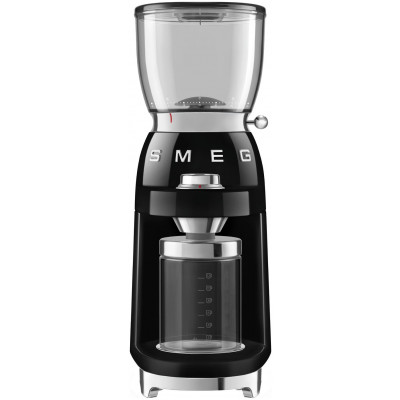
Product details
- Brand: Smeg
- Catalogue number: 134/6536
- Manufacturer's number: 8.02E+12
Smeg Support
Email me this page
Enter your email address to have this page emailed to you *
Useful links
Online supportFAQs
If your coffee bean grinder will not operate, check the following:
- Ensure the coffee bean grinder is plugged into the mains.
- Check that the power button is switched to on.
- Press the Start/Stop button to start grinding the coffee beans.
- Check that a grind setting has been selected.
- Ensure the coffee bean container has been inserted correctly.
- Unplug the coffee bean grinder from the mains, then check to see if the grinder chute is blocked (check the instruction manual for this procedure).
- Check to see if any circuit breakers have tripped.
- Replace the fuse in the plug with the same rating.
If your coffee bean grinder has stopped while it was grinding, check the following:
- Unplug the coffee bean grinder from the mains and try in another mains outlet.
- Check if there is a blockage in the grinder chute (check the instruction manual for this procedure).
- Check to see if any circuit breakers have tripped.
- Replace the fuse in the plug with the same rating.
With some makes of coffee bean grinder, if it has become too hot, this will trigger the automatic shut-off mechanism to prevent damage. Give the coffee bean grinder time to fully cool, then try again.
If your coffee bean grinder is working, but not grinding, check the following:
- Ensure coffee beans have been added to the coffee bean container.
- Unplug the coffee bean grinder from the mains, then check to see if the grinder chute is blocked (check the instruction manual for this procedure).
- Remove the grinder burrs and check that nothing is blocking its rotation (check the instruction manual for this procedure).
The method to clean and maintain your coffee bean grinder machine may vary between models. We always recommend checking your products user manual for specific instructions.
- Unplug the coffee bean grinder from the mains power.
- Empty the ground coffee container after each use, this will prevent a build-up of oil and stale residue.
- Remove and wipe clean the hopper (coffee bean container) with a clean, non-abrasive towel. Avoid using a damp cloth as this can cause coffee beans to stick and jam the grinder burrs.
- Using a dry brush or toothbrush clean and remove any loose grounds from the grinding burrs, the grinding chute and the ground coffee container.
How-to videos
-
How to change your plugs fuse
-
How to Complete a Power Cycle


Returns policy
If you need advice or support for your product, please in the first instance contact the support provider using the number on this support page.
If you still need to return your product then please visit our most up to date returns policy here.