Therabody TheraFace Depuffing Wand – White
767/7584
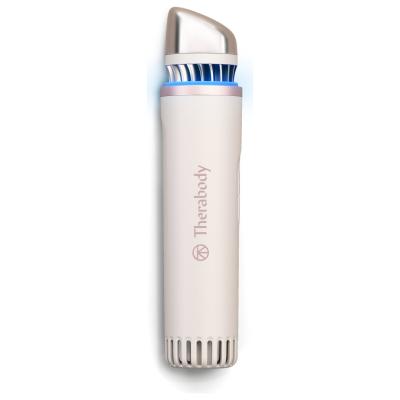
Product details
- Brand: Therabody
- Catalogue number: 767/7584
- Manufacturer's number: TF0004132-3A20
Therabody
Email me this page
Enter your email address to have this page emailed to you *
FAQs
Before beginning your treatment charge your TheraFace Depuffing Wand and begin with a clean, dry face. Avoid using the device over open, broken, or acne covered skin.
- Remove the device cap. Gently pull off the device cap to remove it from the device. Do not use the device while the cap is attached to either end.
- The pre-set treatment time is six minutes. The six-minute timer will reset if you change from cold to hot or hot to cold during treatment.
Turn on the device.
Begin the treatment of your choice by quickly pressing the cold or heat button. The blue LED light will turn on during the cold treatment, and the orange LED light will turn on during the heat treatment.
The cold and heat treatments each have three temperature settings: cold, colder, and coldest and warm, warmer, and warmest.
To change the temperature, quickly press the cold or heat button a second or third time. The LED light will brighten as the temperature intensity increases, and will flash once at the lowest intensity, twice at the second intensity, and three times at the third intensity setting.
Use the Wand on one side of your face gently gliding the device underneath your eyes and throughout your face in upward and outward motions.
After three minutes, the light will flash, signaling you to switch to the other side of your face. For optimal results, wait 20 seconds before switching sides, and then repeat the previous step.
The wand will automatically shut off after completing the six-minute treatment
The TheraFace Depuffing Wand is USB-C enabled and comes with a charging cable. Before charging, ensure the device is powered off and laying on its side.
- Connect one end of the charging cable to the USB-C charging port on the device located on the bottom of the device.
- Connect other end to power adapter. (not included)
- The LED light will indicate the battery status when the device is on or charging.
- Turn on the device to check the battery status.
- Flashing Orange: Low battery
- Flashing Blue: Half battery
- Flashing Green: High battery
- Solid Green: Full battery
The Depuffing Wand is not waterproof. Do not submerge the device in water or clean it under running water.
For everyday use, wipe the base of the device with a damp cloth or alcohol-free cleansing wipe.
Clean the applicator tip with a solution containing less than 70% alcohol or an antibacterial wipe between uses and/or users.
Avoid using alcohol solutions or antibacterial wipes on any other part of the device.
After cleaning, allow the device the dry thoroughly before storing or beginning another treatment.
To store and transport the device, keep the cap on the device.
Store the device in a cool dry place on its side.
Questions & answers
How-to videos
-
TheraFace Depuffing Wand Quick Start Guide
Returns policy
If you need advice or support for your product, please in the first instance contact the support provider using the number on this support page.
If you still need to return your product then please visit our most up to date returns policy here.