Philips Series 9900 SkinAI IPL Hair Removal BRI951/01
735/7206

Product details
- Brand: Philips
- Catalogue number: 735/7206
- Manufacturer's number: BRI951/01
Philips Personal Care Support
 UK:
UK:
 Eire:
Eire:
Email me this page
Enter your email address to have this page emailed to you *
FAQs
If you are unable to resolve the issue, then please either call us using the phone number on this page OR click HERE to arrange a return or exchange.
1.Your skin is or become to dark
The Ready light blinks or lights up orange. Most Lumea devices except SC200x series and SC1991-SC1995) contain a Skin Tone sensor that prevents Lumea from flashing when the skin tone is too dark.
Solution 1: Try using the device on a different area where the skin is lighter Solution 2: Wait until your skin tone on the specific area becomes lighter and suitable for Lumea treatment again.
2. Skin tone sensor is dirty
Solution: Clean the window of the sensor every time before and after usage with a soft, moistened cloth.
3. No proper skin contact
The Ready light will not switch on if there is no (proper) skin contact.
Solution 1: Hold the device at a 90 degrees angle to the desired area. When the device is in full contact with your skin, the Ready light lights up. Solution 2: On bony areas, try another position or press a little harder to make full contact with the skin.
4. Lumea was in the contact with your skin for too long
After a certain amount of skin contact, the skin contact sensor needs to re-calibrate.
Solution: Take the device off your skin for about two seconds before you can continue your treatment. This makes sure that it is measuring the correct skin tone during your treatment.
5. All LED lights blink due to overheating / error mode
All five LED intensity lights blink simultaneously/alternately,
Solution 1: Try to take off the attachment and put it back on again Solution 2: Switch off the device, and unplug it from mains (if use corded). Let the device cool down for five minutes before you restart the device.
6. The attachment is not properly connected to the Lumea device
Solution: Take off the attachment and put it back on again properly. You can also try if another attachment works.
7. You don't hear noticeable sound of fan
Fan is defective.
8. It is not possible to switch the device back on again
Try switching off and on again for several times.
9. Your skin is moist/greasy/creamy
Solution 1: Clean and dry your skin. Make sure there are no body creams, lotions used before the treatment or left on your skin during the treatment. Also, make sure your skin is not sweaty.
Solution 2: Prevent using Lumea in a very warm or humid environment.
1. You are not following treatment schedule
We advise using Philips Lumea once every two weeks for the first four to five treatments to achieve significant hair reduction. To maintain these results, simply repeat the treatment when needed every four to eight weeks. Treatment intervals may vary based on your individual hair growth.
2. You are not removing hair properly
Before using Philips Lumea, make sure your skin is completely hair free. You can remove your body hair by shaving, waxing or epilating. If you choose to wax, we recommend waiting at least 24 hours before using Lumea.
Note: Some hair may grow back even though you have used your Philips Lumea frequently. This happens because the hair are at different stages of the growth cycle during the treatment. The hair that grow back tend to be softer and thinner and eventually fall out.
3. You are not using the correct settings
It is very important to use the correct settings on your Philips Lumea, suitable for your skin tone. Always check the skin tone/hair color table in the user manual.
Some Philips Lumea models (BRI862, BRI863, BRI864, BRI94, BRI95 series) are equipped with a SmartSkin Sensor. The sensor recommends the setting which was comfortable for most women with a skin tone similar to yours. If the treatment feels uncomfortable with these settings you can always lower them manually.
4. You are missing spots
While treating your skin with Philips Lumea, make sure you cover all skin areas and do not miss any spots. Move your Lumea about one cm down or up after each flash to avoid missing any spots. The rim around the treatment window should overlap.
5. You did not clean your Lumea
Clean your Philips Lumea after every usage to extend its lifetime and to avoid burnt spots
6. You stored your Lumea in humid place
Always store your Philips Lumea device in a dry and clean environment, preferably not in a humid place like the bathroom.
7. You are not suitable to use Lumea
In some circumstances, you should not be using Philips Lumea. Check the full list of contraindications/ medications/diseases in the user manual.
1.You didn’t remove all hair from your skin
Before using Philips Lumea, it is important to have a hair-free skin. If there is still hair on the area that you are treating, they may get burnt. This can feel uncomfortable and give off a burning smell or even some smoke.
You can remove your hair by shaving, epilating or waxing. If you choose to wax we advise waiting atleast 24 hours before using Lumea.
2. Your skin is not clean
Before treating your skin with Philips Lumea it should be properly cleaned and dried. Any residues on your skin can be burnt by the Lumea's flash and produce a burning smell.
3. Your Philips Lumea is not clean
he glass on your Philips Lumea needs regular cleaning. A dirty glass can produce an unpleasant or burning smell.
Keeping your Lumea clean is also very important to ensure an effective treatment. So make sure that you clean your Lumea after each use. For proper cleaning instructions refer to the user manual.
At Philips, your safety always comes first. Philips Lumea has been developed with leading dermatologists and fulfills all safety regulations for home-use.
Philips Lumea uses an innovative light-based technology called Intense Pulsed Light (IPL), derived from the technology used in professional beauty salons.
Philips has adapted this technology for effective use in the comfort of your own home. Philips worked closely with skin care experts to develop this technology. For more than 12 years, we carried out extensive consumer research on IPL technology with more than 2000 women.
Philips Lumea only flashes when it is in full contact with the skin. The integrated UV filter ensures that the light only affects the hair and not the skin. If your skin is too dark, the skin color sensor prevents the device from flashing.
To get used to Philips Lumea, we recommend that you first make test flashes near the area you are intending to treat and continue with the highest setting that still feels comfortable and does not give side effects.
We recommend using the Lumea in a well-lit room.
Side effects
• Your skin may show slight redness and/or may prickle, tingle or feel warm. This reaction disappears quickly.
• Your skin may get dry or itchy. You can treat this by cooling the affected area with an ice pack or a wet face cloth. If dryness persists, you can apply a non-scented moisturizer as well.
• For a full list of rare side effects please refer to the user manual. You can also contact us for further support.
If you would like to know how often you should treat your skin with Philips Lumea, find out the answer in the lines below.
We recommend treating your skin with Philips Lumea once every two weeks for the first two months. Using Lumea more often than biweekly may cause skin irritation.
To maintain hair-free skin, we recommend repeating the Lumea treatment every four to eight weeks. This will keep your hair roots inactive and prevent hair from growing back.
No, using your Philips Lumea more often than recommended will not speed up the hair removal process.
Do not treat the same area multiple times in one session as this will not improve efficacy and can cause skin irritation.
es. Philips Lumea has been optimized for use by women, but can be used by men as well.
Recent research shows that men could use Philips Lumea on most areas of the body, except the beard (due to different hair type, thicker and coarser hair), the whole genital area (pubic bone and scrotum) and anus. However, the instructions for use are tailored specifically for use by women.
Philips Lumea is not intended for children under the age of 18 years. Please supervise children to ensure that they do not play with your Lumea device
Your Philips Lumea and its attachment can get warm over time during use, which is normal. Try the following tips to avoid discomfort:
Start the treatment in more heat-sensitive areas like bikini area or underarms while the device and attachment is still cool. Treat your legs afterwards, since they are less sensitive to heat.
Your Philips Lumea is not waterproof. Any contact with water can damage its machinery. Therefore, do not use your Philips Lumea while taking a shower or a bath. Also, make sure your skin is completely dry before using Philips Lumea.
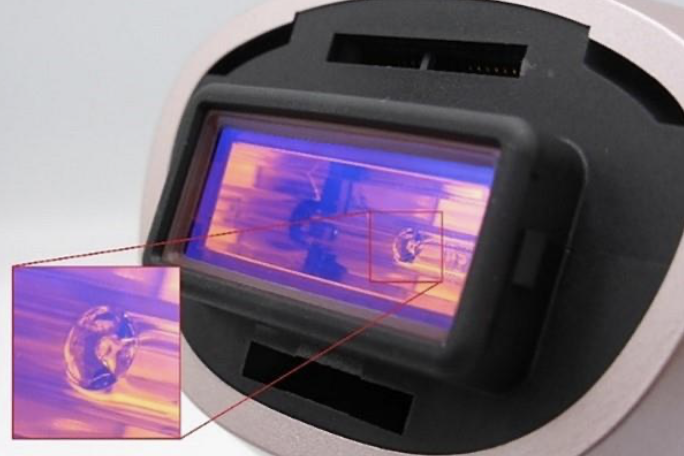
Don’t worry. Your Philips Lumea is not defect and what you see inside your filter glass is not an air bubble. You can find this in each Lumea, due to the production process of the flash lamp.
1. Fallow the treatment schedule
We recommend using Philips Lumea once every two weeks for the first four to five treatments to achieve significant hair reduction result. To maintain these results, simply repeat the treatments when needed every four to eight weeks. Treatment intervals may vary based on your individual hair growth.
2. start with the removing hair from your skin
Start your treatment by first removing all hair from your skin. You can choose to shave, epilate or wax the areas you intend to treat. If you choose to wax, we recommend that you wait at least 24 hours before using Philips Lumea.
3. Select the right settings
Before starting your Philips Lumea treatment, make sure that you select the recommended intensity suitable for your skin and hair color. Always check the skin tone/hair color table in the user manual.
Some Philips Lumea models are equipped with a SmartSkin Sensor. The sensor recommends the setting which was comfortable for most women with a skin tone similar to yours. If a treatment feels uncomfortable with these settings you can always lower them manually.
4. Treat all areas evenly
For Philips Lumea to work effectively it is important that you use it evenly all over your skin and do not miss any spots. However, make sure you do not flash the same area more than once, as this can result in skin reactions.
Regular cleaning is crucial for Lumea’s performance. Residual hair, sweat, or dirt can lead to skin reactions or reduce effectiveness. Clean both your device and skin before each treatment, avoiding water, oil, cream, deodorant, or body milk.
To clean your Lumea:
- Turn off, unplug, and let it cool for 15 minutes before cleaning. Avoid touching the hot light exit window.
- Moisten the cleaning cloth with a few drops of water. Avoid cleaning in wet areas and prevent water from entering the device.
- Gently pull off the attachment and clean all parts of the attachment including metal reflectors and the connector
- Clean the light exit window, ensure the light exit window is free of dirt, residue and moisture and protected by clicking on one of the attachments.
- Store your Philips Lumea: Store all parts in original packaging, bag, pouch, or box in a dust-free, dry place.
Philips Lumea may not be suitable for everyone. Refer to the skin tone and hair color tables in your user manual. All models feature a skin tone sensor to avoid treating overly dark areas.
Unsuitable hair colors include light blond, grey, red, or white, as they absorb insufficient light. Dark brown to dark skin tones may also be unsuitable due to potential pain and burns. Hair color and skin tone can vary across your body, so some areas may be treatable while others may not.
Lumea is safe for treating the female bikini area, including the bikini line, pubic mound, and outer lips, but not suitable for the inner lips or the perineum. For men, Lumea should not be used on the penis, scrotum, perineum, or around the anus due to the sensitivity and thinner skin in these areas.
Your Lumea is not defective; the bubble is part of the lamp from the manufacturing process, present in every device. See the picture below of a new Lumea showing the bubble.

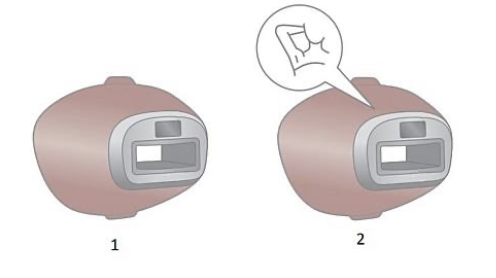
Some Lumea attachments lack a glass filter in the light exit window by design. The body and underarm attachments do not have a glass filter, while the face attachment includes a red glass filter. Depending on the model, the bikini and precision attachments may have a transparent glass filter.
The body and armpit attachments of the Philips Lumea lack glass or a window, but the device has a safety filter for skin protection.
The body attachment is included with all models, while the armpit attachment is found in models BRI947, BRI948, BRI956, and BRI959. Other attachments feature a red or transparent glass or window.
To ensure effective hair reduction and minimize discomfort with your Lumea, check the light intensity setting before each treatment.
Perform a skin test: Test your skin’s reaction before your first treatment on each body area and after sun exposure, as it may alter your skin tone. Test again if resuming treatments after stopping.
How to perform a skin test:
Attach the accessory, treat one spot with setting 1, then move to settings 2-5, stopping if painful. After 24 hours, choose the highest comfortable setting without a reaction.
If no reactions occur after 24 hours, start treatment at that setting. If there is a reaction, choose a lower setting or retest.
Do not use the device if pregnant, lactating, or breastfeeding, as it was not tested on these populations.
It is normal for your Lumea, its attachments, and the adapter to warm during use due to IPL flashes. However, it has safeguards to prevent overheating. Use it in a cool environment and take breaks if it becomes too warm, allowing it to cool before continuing.
To avoid eye damage, do not use Lumea near the eye, eyelid, or eyebrow; use it only below the cheekbones.
Note: never use Lumea on the male beard.
To prevent eye discomfort, use Lumea in a well-lit room, as your eyes are more sensitive to stray light in darker conditions.
If your Philips Lumea Prestige is not fully charged when you start a treatment, the battery will run out during a full body treatment. We advise you to always fully charge the device before you start a treatment or to use it corded.
The battery of your Philips Lumea is not enough for a full body treatment. We recommend you to use it corded while treating large body areas such as legs and/or arms. You can use it cordless on smaller or harder to reach areas like face, armpit or the bikini area.
Store all parts in the original packaging or in the provided bag, pouch or box in a dust-free and dry place.
Yes, you can you use the SkinAI features on multiple mobile devices. Suppose you get a new mobile device, re-install the Lumea app and log in to your MyPhilips account, the SkinAI features will still be unlocked and available.
However, you can only use your Lumea 9900 to unlock the SkinAI features on one MyPhilips account.
The Skin-Selfie Analyser in the Philips Lumea app allows you to build a profile of your skin. If your score is significantly different from one photo to the next, there may be factors preventing you from achieving consistent photo quality.
Try to take a selfie under the same conditions each time, paying particular attention to the following factors:
- Lighting: consistency is important, and lighting may differ significantly depending on the room you’re in and the time of day. Natural light works best, but try and recreate the same lighting conditions each time, whichever light source you use.
- Distance: hold the camera the same distance from your skin each time.
- Angle: try and take the photo so that the camera is pointed directly at the skin being photographed.
Considering the factors above when taking your selfies will lead to a more reliable score and prevent the Skin-Selfie Analyser from giving varied results.
The Body Hair Analyser uses a photo taken from your mobile device to detect the hairs on your skin. When you take photos before each Lumea treatment, you can see your hair removal progress over time by comparing previous results. If the Body Hair Analyser is not correctly registering your hair, follow the steps below:
- Ensure your Lumea app has access to your mobile device’s camera.
- Make sure to take the photo with the camera facing directly at the area being photographed.
- Ensure the area of your body you would like to capture has equal lighting and is not obscured by shadows.
- There must be visible hair growth. Wait about 3–4 days after shaving so that the hair growth is visible in the photograph.
The Philips Lumea IPL app can be used with most modern Philips Lumea models, including the 7000, 8000, 9000 and 9900 Series. On these models, the app provides helpful features such as personalised treatment schedules, reminders, step‑by‑step guidance, and usage tips.
However, not all features are available on every model. Advanced SkinAI features, including the Body Hair Analyser and Skin‑Selfie Analyser, are exclusive to the Lumea IPL 9900 Series and must be unlocked in the app by scanning the QR code on the device handle.
Questions & answers
How-to videos
-
How to use the Lumea IPL 9000/9900 series


Returns policy
If you need advice or support for your product, please in the first instance contact the support provider using the number on this support page.
If you still need to return your product then please visit our most up to date returns policy here.