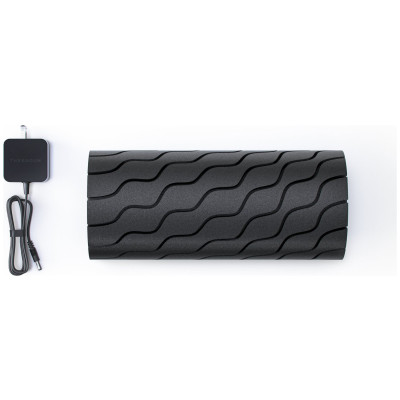
Therabody Wave Smart Vibrating Foam Roller
679/9229
Product details
- Brand: Therabody
- Catalogue number: 679/9229
- Manufacturer's number: WAVEROLLER-PKG-UK
Therabody
Email me this page
Enter your email address to have this page emailed to you *
FAQs
To turn on the WaveRoller, firmly press and hold the power button for 1-2 seconds.
WaveRoller will start on the lowest of the five settings. To increase speed, short press the plus button until desired speed is active.
Place the device under the treatment area gradually applying light to moderate pressure as needed.
To turn off the WaveRoller, firmly press and hold the power button until the device turns off.
Ensure that the device is powered off before charging, the device will not power on while charging.
After turning off the device, plug the power adapter into the charging port.
The LED light on the power button will flash until fully charged.
Charging is complete when the LED light on the power button is solid green.
Batter level is continuously displayed on the LED Light of the power button when the device is on.
To view the battery level when the device is off, briefly press the power button and the LED battery light will flash to indicate the battery level.
- Flashing Red: Low charge
- Flashing Blue: Half-way charged
- Flashing Green: High charge
- Solid Green Fully charged
The WaveRoller NOT waterproof. Do not allow any liquid or water to enter the device or charging port.
Ensure that the device is powered off before cleaning.
To clean, wipe the device surface with a disinfectant wipe to remove any residue.
Once the device is residue-free, use a clean disinfectant wipe to thoroughly clean the device surface, wiping in a circular motion.
Questions & answers
Returns policy
If you need advice or support for your product, please in the first instance contact the support provider using the number on this support page.
If you still need to return your product then please visit our most up to date returns policy here.