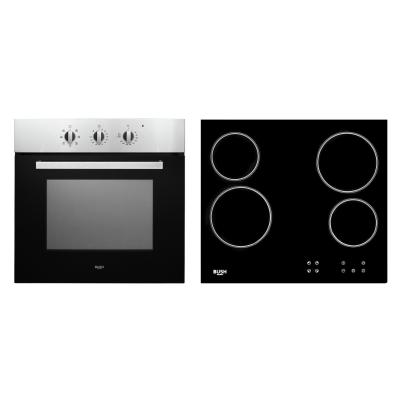
Bush BIBCP Built-In Single Electric Oven & Ceramic Hob Pack
463/9903
Product details
- Brand: Bush
- Catalogue number: 463/9903
- Manufacturer's number: F71IX-G2+CFEA640-0/0
Argos Service Line
 UK:
 Eire:

Argos Troubleshooter
Resolve problems quickly with this easy-to-use tool.
Email me this page
Enter your email address to have this page emailed to you *
FAQs
The oven dials can be removed on this unit for cleaning purposes.
To refit the dial, use the following steps:
- Put the dial back together by fitting the spring inside the main part of the dial.
- Fit the dial collar around it.
- Push the dial back onto the main unit.
- Turn the dial around until it clicks securely into place.
Click the below video for more help on this.
A cooking zone will automatically switch off if the heat setting has not been modified for a specified duration of time. A change in the heat setting of the cooking zone will reset the time duration to the initial value.
To activate the child lock, simultaneously press the increase heat setting button and decrease heat setting button and then press the increase heat setting key again. “L” indicating LOCKED will appear on all heater displays and the controls can not be used. (If a cooking zone is in the hot condition, “L” and “H” will display alternately). The hob will remain in a locked condition until it is unlocked, even if the appliance has been switched off and on.
To deactivate the child lock, first switch on the hob. Simultaneously press the increase heat setting button and decrease heat setting button and then press the decrease heat setting button again. “L” will no longer be displayed and the hob will switch off.
If the hob will not turn on, check the following:
- Check that the hob is connected to the mains and switched on.
- Check the fuse or circuit breaker in the consumer unit.
- Perform a reset by switching the hob off at the mains for several minutes.
- Ceramic hobs rely on ventilation; blocked vents can cause overheating. Ensure that the vents are clear.
- Internal temperature protection systems may shut the appliance off automatically.
- This is a safety feature which indicates residual heat (typically above 60 °C). The indicator will remain until the surface has cooled to a safe temperature.
Questions & answers
How-to videos
-
How to register your product
-
How to Keep Your Oven Working Efficiently
-
How to Clean the Dials
-
How to remove oven doors
-
How to open oven door hinges
Interactive Help
-
Click here to view an interactive step-by-step guide for your product.
-
Argos Troubleshooter
Resolve problems quickly with this easy-to-use tool.


Returns policy
If you need advice or support for your product, please in the first instance contact the support provider using the number on this support page.
If you still need to return your product then please visit our most up to date returns policy here.