CRKD Nitro Deck Controller For Nintendo Switch - Retro Mint
320/1033
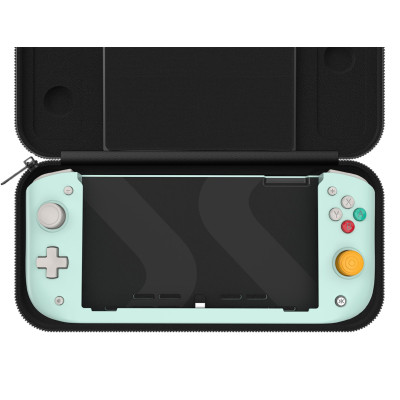
Product details
- Brand: CRKD
- Catalogue number: 320/1033
- Manufacturer's number: 23ND-RM-WW-LIMITED
CRKD Support
 UK:
UK:
 Eire:
Eire:
ONLINE ONLY
ONLINE ONLY
Mon-Sun:
Open 24 hours
Email me this page
Enter your email address to have this page emailed to you *
Useful links
Online supportFAQs
- Ensure that Pro Controller Wired Communication is enabled on your Switch.
- Go to: System Settings → Controllers and Sensors → Pro Controller Wired Communication → ON (Note: This step is required before attaching the Switch to the Nitro Deck).
Ensure you are aligning the console gently and straight with the built‑in USB‑C connector and sliding it until it clicks securely.
- Press and hold the release slider on the back of the Nitro Deck and gently slide the Switch out.
- Always pull straight to avoid strain on the USB‑C connector.
How-to videos
-
How to Fix Controller Stick Drift


Returns policy
If you need advice or support for your product, please in the first instance contact the support provider using the number on this support page.
If you still need to return your product then please visit our most up to date returns policy here.