KODAK PRINTER SLIM BARBIE PRINTER SIG
774/2268
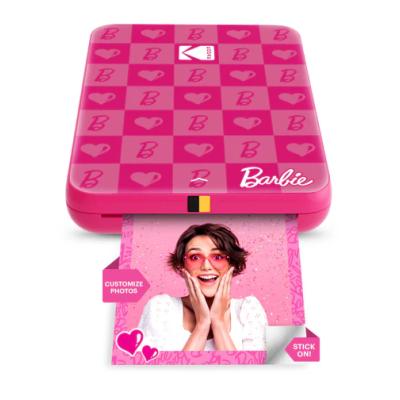
Buy it on Argos.co.uk
 UK:
UK:
 Eire:
Eire:
Product details
- Brand: Kodak
- Catalogue number: 774/2268
- Manufacturer's number: RODMSB20
Kodak Support Center
UK:
Eire:
ONLINE ONLY
ONLINE ONLY
Mon-Sun:
Closed
Email me this page
Enter your email address to have this page emailed to you *
Useful links
Online supportFAQs
- Make sure the internal battery is charged using the included micro‑USB cable.
- Check the charge indicator light:
- Red = charging
- Green = fully charged
- Press and hold the power button for 4–5 seconds until the LED begins blinking—this indicates pairing mode.
- Open your phone’s Bluetooth menu and select “KODAK STEP Slim” when it appears.
- If it still doesn’t connect, restart both your phone and the printer and retry pairing.
- Make sure you are using only KODAK ZINK 2"x3" paper.
- Ensure the paper pack is loaded correctly with the blue calibration sheet placed first, barcode facing down.
- Avoid exposing the paper to excessive heat or sunlight, which can cause print issues.
- Clean the printer only with a slightly damp soft cloth—never use solvents or soak the device
A blinking red status LED indicates an error.
Check the following:
- Paper loaded correctly (blue sheet first, barcode down).
- Lid fully closed.
- No jammed or damaged sheets inside.
Similar products
Returns policy
If you need advice or support for your product, please in the first instance contact the support provider using the number on this support page.
If you still need to return your product then please visit our most up to date returns policy here.