TB MULTI SHIFTER FOR RACE WHEEL
722/0058
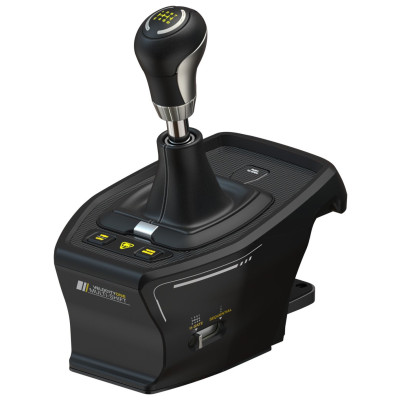
Product details
- Brand: Turtle Beach
- Catalogue number: 722/0058
- Manufacturer's number: TBS-0001-05
Turtle Beach Support
 UK:
 Eire:
Email me this page
Enter your email address to have this page emailed to you *
Useful links
Online supportFAQs
If your Xbox console does not recognize the VelocityOne Multi-Shift, please make sure it is directly connected to the VelocityOne Race. While it can be connected separately on PC, the Xbox explicitly requires it to be connected to the Race. It's also important that you are using the provided cable to do so. Third party cables often don't meet the requirements. If the Multi-Shift is still not being recognized, download the Turtle Beach VelocityOne Tuner app from the Xbox store and navigate to the Firmware tab of the Race within the application. Here, find the "System Firmware" section and update or refresh the firmware, depending on whether the newest version has been installed already.
If the Multi-Shift is connected to the VelocityOne Race using the provided cable, it won't show as an individual device within the VelocityOne Tuner app. Instead, it appears as a tab when accessing the Race through the app. When using the Multi-Shift on a Windows-PC and connecting it directly instead of to the Race, make sure to use the provided cable as other cables may not meet the requirements.
If the Multi-Shift's handbrake button isn't working (indicated by it not changing colors when pressing), you're likely not in sequential mode. On the right side of the device's base is a switch that allows mechanically switching between H-Gate and Sequential modes. H-Gate mode does not allow using the device as a handbrake. Please also note that the button itself is not the handbrake but instead toggles between the Multi-Shift's stick being used for gear-shifting and for handbraking when in sequential mode.
If you're having trouble with an update, the first thing to do is ensure the Multi-Shift is connected properly to either the Race or the PC. It is also vital to directly connect the Race or Multi-Shift and not use any sort of USB-Hub or KVM Switch. These can interrupt signals and cause issues with updates. During the Firmware update it is also important to keep the update window in focus, even though it may be tempting to focus on other things while the update is running. If the update still is unsuccessful, relaunch the VelocityOne Tuner app and reconnect the Multi-Shift. If connected to the VelocityOne Race, please reconnect the Race as well. If you're still running into issues, make sure you have a stable internet connection. It's also sensible to restart your PC or console, and, when on PC, to temporarily disable your antivirus software to avoid interference between the Tuner app's communication and our servers.
When trying to change the knob or shaft of the Multi-Shift you may find that the currently attached one is sitting very tight. If it is too tight to securely unscrew, you can find a hole within the shaft that can be used for leverage. Push down the hood that is attached to the Mutli-Shift's base to reveal the shaft and find a thin object that fits through the hole. This can then be used as leverage to unscrew the attachment.


Returns policy
If you need advice or support for your product, please in the first instance contact the support provider using the number on this support page.
If you still need to return your product then please visit our most up to date returns policy here.