PowerA Enhanced Nintendo Switch Wireless Controller Fortnite
416/0441
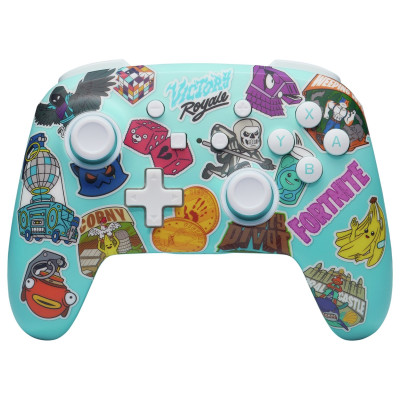
Buy it on Argos.co.uk
 UK:
UK:
 Eire:
Eire:
Product details
- Brand: PowerA
- Catalogue number: 416/0441
- Manufacturer's number: NSGP0290-01
PowerA
UK:
Eire:
ONLINE ONLY
ONLINE ONLY
Mon-Sun:
Open 24 hours
Email me this page
Enter your email address to have this page emailed to you *
Useful links
Online supportFAQs
- Hold the Program Button down for 3 seconds The Lumectra lighting will slowly blink in white, signalling the controller is in program mode
- Press the button you wish to assign to an Advanced Gaming Button the Lumectra lighting will blink quickly.
- Press the Advanced Gaming Button (AGR or AGL) that you wish to perform that function The Lumectra lighting on the side of the selected advanced gaming button will blink 3 times, signalling the Advanced Gaming Button has been assigned
- Repeat for the remaining Advanced Gaming Button
- Hold the program button down for 2 – 3 seconds The Lumectra lighting will slowly flash, signalling the controller is in program mode
- Press either AGL or AGR to individually reset each button or hold down the Program Button for 5 seconds to reset both simultaneously
- It is important that when the controller is paired or reconnected to the Nintendo Switch system that the sticks are not touched. If this happens, turn the controller off by pressing the SYNC button once, then turning it back on by pressing the HOME button without touching the sticks.
- Make sure the controller battery is not depleted.
How-to videos
-
How to Fix Controller Stick Drift
Returns policy
If you need advice or support for your product, please in the first instance contact the support provider using the number on this support page.
If you still need to return your product then please visit our most up to date returns policy here.