Strikesphere Soccer Bot
363/6804
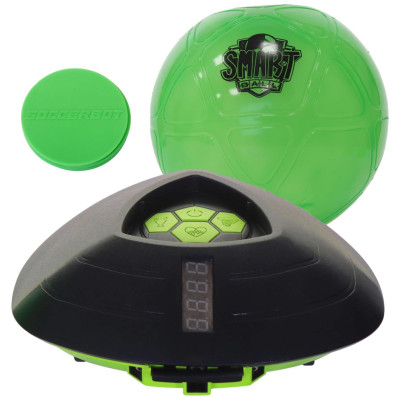
Product details
- Brand: Smart Ball
- Catalogue number: 363/6804
- Manufacturer's number: 1001CB
Argos Technical Support
 UK:
 Eire:
Email me this page
Enter your email address to have this page emailed to you *
Useful links
FAQs
First insert the batteries. Once the batteries are inserted the ball is switched on and ready to go! Switch on the SOCCERBOT by choosing either mode A (Standard) - for hard flooring surfaces or mode B (Boost) - for soft floor surfaces such as short pile carpet, you will find the switch on the underside of the BOT. Always switch the SOCCERBOT to OFF when not in use. If left in mode A or mode B the batteries will discharge slowly.
Unscrew clockwise with the tool provided, once loosened, twist and pull the battery compartment upwards.
Insert the batteries, re insert the compartment into the slot and screw clockwise. Once inserted a red light will show.
Ensure it is on a flat smooth surface. Place the football at your feet and place the SOCCERBOT facing the ball approximately 1 meter away. Place the x4 zone disks around the soccer Bot and yourself to mark out the active play zone. Suggest an area of 1.5 x 1.5 meters square. However, this area can be to the shape and size of your choice. The smaller the area the more challenging the game play.
The purpose of the game is to keep the ball moving whilst SOCCERBOT attempts to tackle you by striking the ball. After setting up the Game Zone.
- Place the SOCCERBOT within 1.5 meters from the ball.
- There are 3 different speed levels to choose between to start the game.

- Press the corresponding button on the top of the SOCCERBOT.
- Step back behind the ball ready to play, the SOCCERBOT will now charge towards the ball and attempt to strike the ball.
- If the SOCCERBOT strikes the ball, you will lose a life.
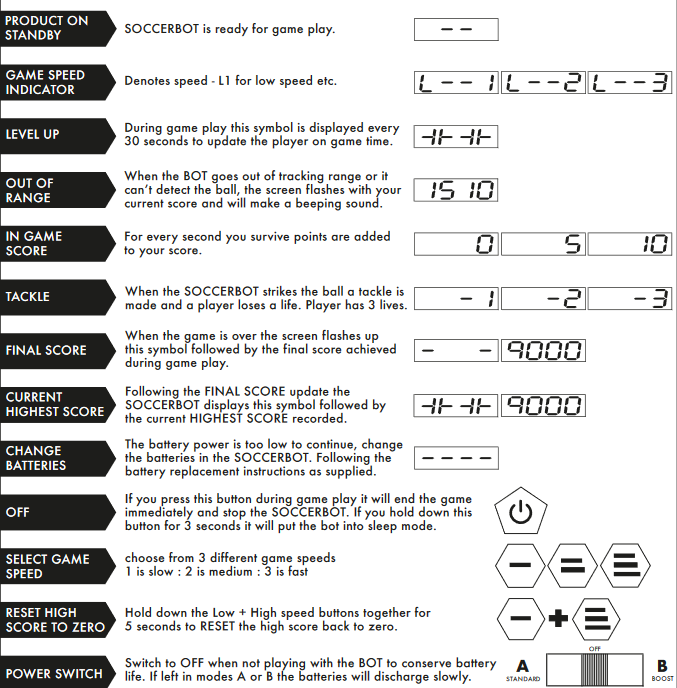
- You have 3 lives. If the SOCCERBOT strikes the ball 3 times, it's game over and the SOCCERBOT will stop and end the game.
- If the SOCCERBOT doesn't manage to steal all your 3 lives after 5 mins of play, you win!
- The SOCCERBOT will then display your final score followed by the current highest score.
- To play again, adjust the GAME ZONE area if required, place the ball and the SOCCERBOT in their starting positions and press a suitable skill level button, slow, medium or fast.
We recommend that you play with the ball slightly deflated, soft and slightly squashy to the touch. This makes it easier to control in tight spaces.
You can however inflate the ball with a hand pump (not provided) to increase the firmness if desired.
If the ball is out of range of the SOCCERBOT sensors, the BOT will start to spin on the spot or start hunting for the ball to try to locate the football. Move the ball closer to the BOT to re-engage and restart the game play.
If the BOT can't find the football within 20 seconds, it will stop searching and end the game.
The range is approx. 1.5 meters to detect the ball location. Stay within this range for continuous game play.
Questions & answers
How-to videos
-
Setting up and Using the Soccer Bot
-
Troubleshooting Tips for the Soccer Bot
Returns policy
If you need advice or support for your product, please in the first instance contact the support provider using the number on this support page.
If you still need to return your product then please visit our most up to date returns policy here.