Bush TDHP7KG2025 7KG Heat Pump Tumble Dryer - White
776/5953
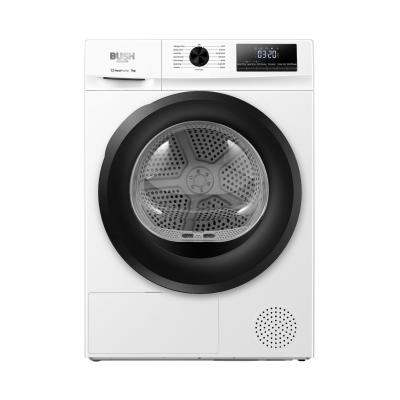
Buy it on Argos.co.uk
 UK:
UK:
 Eire:
Eire:
Product details
- Brand: Bush
- Catalogue number: 776/5953
- Manufacturer's number: DHMY70
Argos Service Line
Email:
UK:
Eire:
0345 257 7271
+44 345 257 7271
Mon-Sat:
Sun:
9am to 6pm
10am to 4pm
Email me this page
Enter your email address to have this page emailed to you *
FAQs
If the appliance is noisy, check the following:
- Ensure the lint filter is clean by removing, cleaning, drying and refitting.
- Clean the air intake shroud from any lint or debris, dry and then refit.
- Check that the appliance is on a stable, level surface with sufficient clearance around it.
- Ensure that the vents are not trapped or blocked which could create excessive noise.
If the programme is stopping, try the following:
- Ensure the door is closed correctly with nothing obstructing it.
- Ensure the lint filter is clean by removing, cleaning, drying and refitting.
- Wipe the humidity sensors inside the drum to remove debris (if available on your model).
- Clean the air intake shroud from any lint or debris, dry and then refit.
- Perform a power reset by unplugging the appliance from power, holding down the Start/Pause button for 10 seconds, waiting 30 seconds and trying the appliance again.
- Check that the load size is not too big or too small for the programme selected as it may overload or underload.
If the cycle won’t start, try the following:
- Ensure the door is closed correctly with nothing obstructing it.
- Ensure a time delay has not been set.
- Check that power is going to the appliance.
- Ensure the lint filter is clean by removing, cleaning, drying and refitting.
- Wipe the humidity sensors inside the drum to remove debris (if available on your model).
- Clean the air intake shroud from any lint or debris, dry and then refit.
- Perform a power reset by unplugging the appliance from power, holding down the Start/Pause button for 10 seconds, waiting 30 seconds and trying the appliance again.
Questions & answers
How-to videos
-
How to register your product
Interactive Help
-
Click here to view an interactive step-by-step guide for your product.


Returns policy
If you need advice or support for your product, please in the first instance contact the support provider using the number on this support page.
If you still need to return your product then please visit our most up to date returns policy here.