HUMAX FREELY PVR 2TB
772/3050
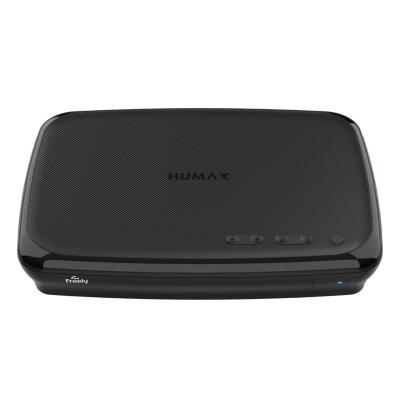
Product details
- Brand: Humax
- Catalogue number: 772/3050
- Manufacturer's number: HUMAX FHR-6000T 2TB
Humax Support
 UK:
UK:
 Eire:
Eire:
Email me this page
Enter your email address to have this page emailed to you *
Useful links
Online supportFAQs
Because Freely Channels are IP (internet) based channels, they cannot be recorded. An aerial needs to be connected. Only Terrestrial TV channels received through a traditional aerial can be recorded.
There are two guides on your Set Top Box which serve different purposes:
- Freely Guide – This shows both Freely IP (internet) channels and channels received through the aerial (Terrestrial DTT).
- Recording Guide – This shows only channels and channels received through the aerial (Terrestrial DTT) that can be recorded.
- Yes. But if you disable Freely, the Freely interface will no longer be available, and all Freely IP (internet) channels will be removed from the channel guide.
(Most of the IP channels have channels that can be viewed through the aerial but may have different channel numbers).
To disable Freely on most Freely PVR devices, carry out the following:
- Go to Menu.
- Device Settings.
- Live TV Preference.
- Set Install Freely UI to Off.
- You will be directed to the Home Interface.
Check your Freely PVR instruction manual for exact instructions.
To enable Freely on most Freely PVR devices, carry out the following:
- Go to Menu.
- Device Settings.
- Live TV Preference.
- Enable Freely.
- Activate.
Check your Freely PVR instruction manual for exact instructions.
Yes. You can record channels received through the aerial (Terrestrial DTT).
Note: Freely Channels are IP (internet) based channels, they cannot be recorded.
To record a programme on most Freely PVR devices, carry out the following:
- Press Menu on your remote.
- Select Recording Guide.
- Scroll to and select the programme you wish to record.
- Select Record or Schedule Recording.
Check your Freely PVR instruction manual for exact instructions.


Returns policy
If you need advice or support for your product, please in the first instance contact the support provider using the number on this support page.
If you still need to return your product then please visit our most up to date returns policy here.