Anker SOLIX PS30 Portable Solar Panel
767/8301
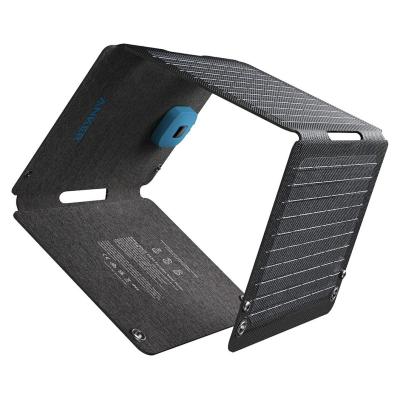
Product details
- Brand: Anker
- Catalogue number: 767/8301
- Manufacturer's number: A24260A1
Anker Support
Email me this page
Enter your email address to have this page emailed to you *
Useful links
Online supportFAQs
No, Anker portable solar panels only work in direct sunlight. They will not charge devices indoors or under artificial light.
If a cloud or shadow interrupts sunlight, charging pauses immediately and may not resume automatically.
To restart charging, you may need to unplug the cable and reconnect it, or fold/unfold the panel in full sunlight.
Portable solar panels (21W–100W range) can charge:
- Smartphones
- Tablets
- Small USB devices
Common reasons include:
- Insufficient sunlight (partial shade → no charging).
- Cloud interruption requiring manual reconnection.
- A faulty cable.
- The device is drawing more power than the panel can provide.
If the solar panel is connected, but the device is not charging, check the following:
- Ensure all cables, plugs and adapters are fully connected and undamaged.
- Ensure the solar panel is in direct sunlight and not shaded. Even partial shading can significantly reduce output.
- Check that the output of the solar panel is compatible with the device (check your solar panel instruction manual for this information).
To maximize the solar charging performance, try the following:
- Keep the solar panel perpendicular to the sunlight whenever possible.
- Reposition the solar panel during the day as the sun moves.
- Clean the solar panel surface when dirty.
Usually yes, but only according to the manufacturer's instructions.
- EcoFlow provides guidance for both parallel and series connections using suitable MC4 cables and connectors.
- Jackery notes that when using Y-cables or panel connectors, compatible panel configurations and matching panel power ratings should be used.
- Ensure the solar panel is turned off and disconnected from your device.
- Remove any loose dirt using a clean microfibre cloth.
- Clean your solar panel by wiping them with warm water using a non-abrasive cloth.
- Wipe the solar panel dry with a clean microfibre cloth.
Returns policy
If you need advice or support for your product, please in the first instance contact the support provider using the number on this support page.
If you still need to return your product then please visit our most up to date returns policy here.