Therabody Rechargeable Padded Sleep Mask
454/7679
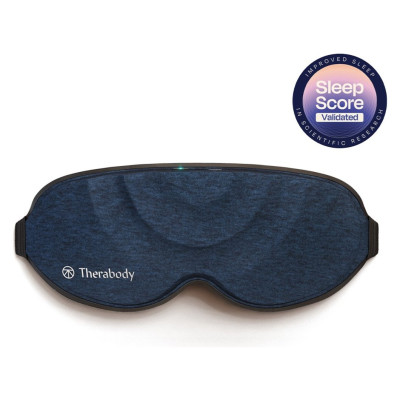
Product details
- Brand: Therabody
- Catalogue number: 454/7679
- Manufacturer's number: SM0004081-3A30
Therabody
Email me this page
Enter your email address to have this page emailed to you *
FAQs
- Download the Therabody app from the App Store or Play Store.
- Follow the in-app instructions to create a new app account and verify your email.
- Once logged in, browse the expansive catalog of TheraMind sound therapy tracks to listen to during your SleepMask treatment. These science-backed audio tracks use special composition techniques to help you relax and sleep.
- Select a sound that works for you. Whether you prefer the soothing sounds of nature, peaceful piano melodies, or even guided meditations.
- Save your favorite sounds for easy access.
- Set a sleep timer so that the sound gently fades as you drift off to sleep
Only use on clean, dry skin. Remove makeup, eyeglasses, and contact lenses prior to use.
Place the device on your head and adjust the strap.
The strap should sit just above your ears.
For a full light blocking experience, tighten the strap by adjusting the buckle. Moving it to the right will tighten the strap and the left will loosen the strap.
The device should feel snug on your face yet still comfortable.
Find a comfortable sleeping position on your back, side or stomach and adjust the device to ensure its secured.
Firmly press and hold the multi-functional power button located on the top center of the mask. The LED Light on the button will turn on when the device is on.
- Press the power button again to toggle through the three vibration patterns:
- Pulse
- Wave
- Constant
Each vibration pattern has two intensity levels; low and high. The first pattern starts at low intensity. Press the button again to switch to high intensity or keep pressing to cycle through each vibration pattern and intensity level.
The intensity level will gradually decrease as the treatment progresses.
The stored memory feature will remember the last vibration pattern used so next time you turn on your device, the same pattern will start.
The full treatment will last for 15 minutes. The LED light on the button will turn off 5 seconds after the treatment starts.
The device will automatically shut off after the treatment is complete.
Press the button at any point during the treatment to turn the device off. The LED light on the button will turn off when the device is off.
When not in use or during transport, lock the device to prevent it from turning on accidentally. Quickly press the button three times to initiate the lock feature. The device will flash three times when successfully locked. Quickly press three time again to unlock. The device will flash three times when successfully unlocked.
SleepMask is USB-C enabled and comes with a charging cable. Before charging the device, ensure that the device is powered off.
Connect one end of the charging cable to the USB-C charging port on the device located in the top center next to the power button.
Connect other end to power adapter. (not included)
The LED light, next to the USB-C port will indicate the battery status when the device is on or charging.
Press the button to check the battery status while the device is off..
Flashing Orange: Low battery
Flashing Blue: Half battery
Flashing Green: High battery
Solid Green: Full battery
Carefully remove the inner layer from the device following the instructions above. Place ONLY the removable inner layer into the washing machine.
Machine wash the removable inner layer on cold with mild detergent using the delicate wash cycle.
Once the wash cycle is complete, remove the inner layer from the washing machine and lay it flat to air dry completely in a cool and dry area. Wait until completely dry before reassembling and using the device. DO NOT place the inner layer in the dryer, as the heat will damage the fabric. DO NOT wring, twist, or squeeze the inner layer to dry.
Follow the same cleaning instructions above to wash the travel pouch. Hand-wash after 75 cycles.
The outer control layer of the device is NOT waterproof, hand-washable, or machine-washable. Do not allow excess liquids or water to enter the device.
To clean the outer control layer, wipe the fabric with a non-abrasive, lint-free cloth.
Lightly dampen a non-abrasive, lint-free cloth with water or an alcohol-based solution to clean if necessary. Do not allow water to touch or enter the power button or USB-C port.
Dry with a non-abrasive, lint-free cloth.
Questions & answers
Returns policy
If you need advice or support for your product, please in the first instance contact the support provider using the number on this support page.
If you still need to return your product then please visit our most up to date returns policy here.