LawnMaster 46cm Cordless Rotary Lawnmower - 48V
502/8946
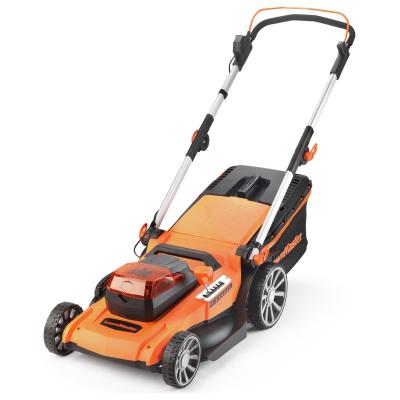
Product details
- Brand: Lawnmaster
- Catalogue number: 502/8946
- Manufacturer's number: CLMF4846A-01
Cleva-UK Customer Support
 UK:
UK:
 Eire:
Eire:
Email me this page
Enter your email address to have this page emailed to you *
Useful links
Online supportFAQs
Uneven cutting of grass can usually be caused by the grass collection or the length of the grass.
If the lawnmower is cutting unevenly, check the following:
- Check that there is not a build-up of grass clipping and debris. Before removing the clippings, ensure the mower is powered off completely and unplugged.
- Check that the grass is not too long for the cutting height. If the grass is quite long, we recommend adjusting the cutting height higher and only cutting a small amount at a time.
- Check that there is no damage to the blades. If there is any damage, you may need to sharpen or replace the blade. Refer to your user manual for how to proceed with this.
If the lawnmower is not cutting at all, check the following:
- Check that there is not a build-up of grass clipping and debris. Before removing the clippings, ensure the mower is powered off completely and unplugged. Once any clippings are removed, carefully check to see if there is movement when turning.
- Check that the grass is not too long for the cutting height. If the grass is quite long, we recommend adjusting the cutting height higher and only cutting a small amount at a time. Similarly, ensure that the cutting blade height is not too high that it is not touching the grass at all.
- Check that there is no damage to the blades. If there is any damage, you may need to sharpen or replace the blade. Refer to your user manual for how to proceed with this.
It is normal for the lawnmower to make a noise whilst cutting due to the motor operation and the turning of the blades. However, if the noise seems abnormal or louder than usual, check the following:
- Check that there is not a build-up of grass clipping and debris. Before removing the clippings, ensure the mower is powered off completely and unplugged.
- Check that there is no damage to the blades. If there is any damage, you may need to sharpen or replace the blade. Refer to your user manual for how to proceed with this.
- Check that the grass collection container is full. If it is full of clippings, then you may hear excess noise from the container. To resolve this, turn off, empty the container, and then turn on to resume operation.
If the lawnmower won’t start, try the following:
- Press and hold the safety button before applying the power button/lever (check the user manual for the location of this button).
- Check that the battery has been fully charged and is fitted correctly into the unit.
- Check the battery temperature; if the battery feels too warm or cold after charging/storage allow it time to get to the recommended operating temperature before turning on. This information can usually be found in your user manual.
- Check that there is not a build-up of grass clipping and debris. Before removing the clippings, ensure the mower is powered off completely and unplugged.
- Check that the grass is not too long for the cutting height. If the grass is quite long, we recommend adjusting the cutting height higher and only cutting a small amount at a time.
If there is a loss of power when mowing, check the following:
- Check that there is not a build-up of grass clipping and debris. Before removing the clippings, ensure the mower is powered off completely and unplugged.
- Check that the grass is not too long for the cutting height. If the grass is quite long, we recommend adjusting the cutting height higher and only cutting a small amount at a time.
- Check that the battery has been fully charged and is fitted correctly into the unit.
- Check the battery temperature; if the battery feels too warm or cold after charging/storage allow it time to get to the recommended operating temperature before turning on. This information can usually be found in your user manual.
If your robotic lawnmower has stopped while mowing, please check the following:
Ensure the robotic lawnmower is turned off and the battery is removed before carrying out any inspection or maintenance.
- Check for any grass or debris wrapped around the wheels.
- Wearing protective gloves check for and remove any grass or debris wrapped around the blade disc.
- To prevent your robotic lawnmower from getting stuck, fill any dips or holes in the lawn with topsoil and seeded with grass seed.
If your robotic lawnmower fails to start, please check the following:
Ensure the robotic lawnmower is turned off before carrying out any inspection or maintenance.
Check your user manual for the below procedures.
- Check that isolator key is correctly fitted.
- Ensure the battery is correctly fitted and fully charged.
- Remove the isolator key and battery. Wearing protective gloves check underneath the robotic lawnmower and clear any grass or debris.
- The grass maybe too high, adjust the cutting height.
If your robotic lawnmower vibrates, please check the following:
Ensure the robotic lawnmower is turned off and the battery is removed before carrying out any inspection or maintenance.
Check your user manual for the below procedures.
- Check that the cutting blades screw has not become loose.
- Check the cutting blades for any damage.
- Check that only one blade is fitted at each screw and that the blades are not stuck.
If the grass is being cut unevenly, please check the following:
Ensure the robotic lawnmower is turned off and the battery is removed before carrying out any inspection or maintenance.
Check your user manuals for the below procedures.
- The work area may be too big. Adjust the borders/protections to decrease the size of the mowing area. Recharge the battery to mow the area twice or purchase an additional battery to increase the size of the cut area.
- The cutting height is too low, or the grass is too long. Increase the height of the cut.
- The cutting blades may be blunt. Replace all the blades and screws.
Returns policy
If you need advice or support for your product, please in the first instance contact the support provider using the number on this support page.
If you still need to return your product then please visit our most up to date returns policy here.