Ring Outdoor Camera Plus Battery - Black
753/9031
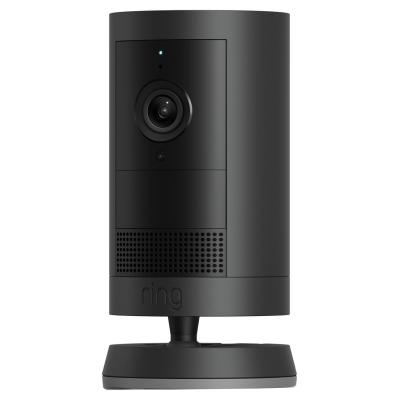
Buy it on Argos.co.uk
 UK:
UK:
 Eire:
Eire:
Product details
- Brand: Ring
- Catalogue number: 753/9031
- Manufacturer's number: B0D23XCY18
Ring Support
UK:
Eire:
01727 263045
00 800 87 00 97 81
Mon-Sun:
Open 24 hours
Email me this page
Enter your email address to have this page emailed to you *
Useful links
Online supportFAQs
If the battery is draining fast on your Ring Outdoor Cam Plus, check the following:
- Too many motion events / Live Views - Reduce sensitivity, lower frequency of motion capture, reduce number of motion-zones, or redirect the camera away from busy areas.
- Poor Wi-Fi signal - Weak or unstable Wi-Fi causes the camera to drop/reconnect repeatedly, using extra power. Check signal strength (RSSI) in Device Health. Possibly move router or add repeater.
- Cold weather - Batteries discharge more quickly in cold conditions. If possible, shield the camera slightly from extreme cold or keep it warmer.
- Feature settings - Features like continuous recording, very frequent snapshots, high motion sensitivity, or intense light if applicable, can all increase power usage. Disable or reduce non-essential features.
If the battery is not charging on your Ring Outdoor Cam Plus, check the following:
- Test the power source: try a different USB outlet or adapter to ensure there’s nothing wrong with the outlet.
- Try a different charging cable; sometimes cables fail or have loose connectors.
- Ensure the battery is properly seated/clicked inside the battery compartment. Sometimes it won’t make contact properly.
- Wait a moment after reinserting the fully charged battery; the device may take up to 60 seconds to power back on.
- If after charging and reinsertion, battery level doesn’t change or the device still shows “Offline” or “Low battery,” there may be a hardware issue. Consider contacting Ring Support.
- In the Ring app: go to the Dashboard → select the Outdoor Cam Plus → tap ••• (More) → Settings → Device Health.
- In Device Health, under Power, you should see the battery level (percentage) and what power source it is using.
If your Ring Outdoor Cam Plus fails to connect or stay connected to the Wi-Fi, check the following:
- Make sure your Ring app on phone is up to date.
- Position the camera within range of your Wi-Fi router. Avoid too many walls/obstacles.
- Ensure your Wi-Fi is broadcasting on 2.4 GHz (5 GHz is supported, but 2.4 GHz has better range).
- Ensure there is no active VPN on the mobile that might interfere.
To factory reset your Ring Outdoor Cam Plus, carry out the following:
- Hold Setup button for 20 seconds then release. For cameras this resets to factory defaults.
After reset, you’ll need to set up again in the Ring app as if new.
Questions & answers


Returns policy
If you need advice or support for your product, please in the first instance contact the support provider using the number on this support page.
If you still need to return your product then please visit our most up to date returns policy here.